
Why Your Office Wi-Fi Dies on Monday Morning (And the 5 GHz Fix)
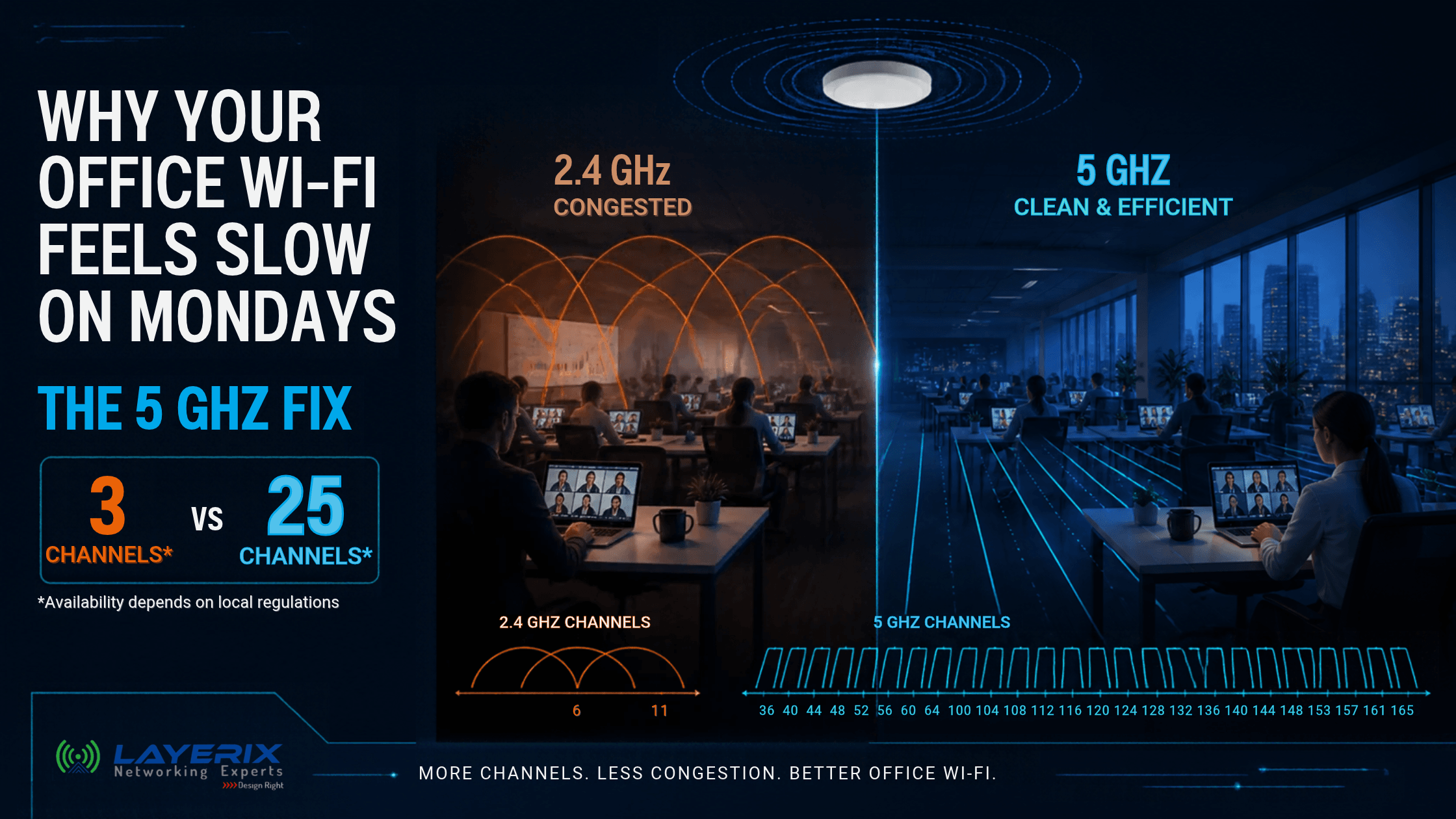
It's 9:05 on a Monday morning. Sixty people walk in, open their laptops and join the first video call of the week. Within minutes, every call freezes. Someone shouts, “Is the internet down?”
It isn't. The internet link is fine. The access points show green lights. The router is healthy. So what's wrong?
The answer hides in one number most people never check: 3. Let's see why that number decides how your office Wi-Fi behaves, and why one small group of devices in your building can still ruin the fix.
3 Lanes vs 24 Lanes: The Whole Story in One Picture
2.4 GHz
Only channels 1, 6 and 11 can run side by side without overlapping.
3 channels
5 GHz
Around 24 usable 20 MHz channels under India's delicensed 5 GHz ranges.
24 channels
Why 2.4 GHz Is Like Parking Trucks in Bicycle Spaces
On paper, the 2.4 GHz band has 14 channels. In reality, your regulator decides which ones you may use. In India, the 2.4 GHz band (2400 to 2483.5 MHz) is licence-free, and access points here can use channels 1 to 13. The US and Canada stop at channel 11, and channel 14 isn't permitted in these regions. Even with 13 channels to choose from, only 1, 6 and 11 stay clear of each other.
Here is the catch. The centre of each channel is only 5 MHz from its neighbour, but each Wi-Fi signal is roughly 20 to 22 MHz wide. The channels spill into each other. To avoid overlap, channels must be at least 25 MHz apart, and that leaves exactly three: 1, 6 and 11.
Eleven channels, three that don't collide. Everything else overlaps.
What this means for a 10-AP office
You have ten access points and three channels, so each channel gets reused again and again. Access points on the same channel don't add capacity. They take turns, like three cashiers sharing one till. And 2.4 GHz is shared with Bluetooth, cordless equipment, the pantry microwave and the router in the next office.
| Region | 2.4 GHz channels allowed | Usable non-overlapping set |
|---|---|---|
| India (DoT / WPC) | 1 – 13 | 1, 6, 11 (the standard choice) |
| Many European countries | 1 – 13 | 1, 6, 11 (most commonly chosen) |
| US / Canada (for comparison) | 1 – 11 | 1, 6, 11 |
Rules shown for India follow the Department of Telecommunications licence-exemption notifications. Always confirm the current rules and your vendor's India channel list before finalising a design.
Now Meet 5 GHz: The Wide-Open Highway
5 GHz works in four U-NII bands. Its channels are spaced 20 MHz apart, so they don't spill into each other the way 2.4 GHz channels do. Same 60-person office, but now your access points have a lot more room to avoid each other.
Quick trick: work out any channel's frequency
Multiply the channel number by 5, then add 5000. Channel 36 × 5 = 180, plus 5000 = 5180 MHz, which is 5.18 GHz.
What India Allows: Your Channel Map
In October 2018, the Department of Telecommunications removed the licence requirement for most of the 5 GHz band, for both indoor and outdoor use. For an office in India, that opens up the ranges below.
| Frequency range | 20 MHz channels | DFS? | Note |
|---|---|---|---|
| 2400 – 2483.5 MHz | 1 – 13 (use 1, 6, 11) | No | Crowded: only 3 clean channels |
| 5150 – 5250 MHz | 36, 40, 44, 48 | No | Easiest 5 GHz channels to start with |
| 5250 – 5350 MHz | 52, 56, 60, 64 | Yes | Radar detection required |
| 5470 – 5725 MHz | 100 – 140 (11 channels) | Yes | Channel 144 may not be available, as its 20 MHz span runs past 5725 MHz |
| 5725 – 5875 MHz | 149, 153, 157, 161, 165 | No | No DFS, good for legacy-friendly designs |
The India count: 3 vs about 24
That's 4 + 4 + 11 + 5 = 24 standard 20 MHz channels on 5 GHz, against 3 clean channels on 2.4 GHz. Your exact list depends on the India regulatory domain on your access points, so set the country correctly and check the vendor's India channel list.
“Then I'll Max Out the Channel Width, Right?”
Not so fast. 5 GHz can bond channels for more speed, but every bonded channel eats into your channel budget.
Most channels. Best for density.
Twelve channels. Often the sweet spot.
Few channels. Risky in dense offices.
Very few. Hard to reuse properly.
For a busy office with many access points, 20 or 40 MHz usually wins. Speed is nice, but the number of clean channels is what keeps calls stable. On 2.4 GHz, stay at 20 MHz.
Three Office Scenes You'll Recognise
“The open-plan office”
Eighty laptops and all-day video calls. On 2.4 GHz, there aren't enough channels to spread the access points out. On 5 GHz, the same density is manageable.
“The shared floor”
Four companies on one floor, all with routers on 2.4 GHz channel 6. Nobody wins. 5 GHz gives your office cleaner airspace.
“The stockroom”
Everything is on 5 GHz and it all works beautifully. Until someone asks why the handheld scanners stopped connecting. (Hold that thought.)
These are illustrative scenarios, not specific client case studies.
5 GHz Isn't Perfect: Know These Before You Deploy
Shorter range
5 GHz fades faster through walls. You'll need more access points, placed using a proper site survey.
DFS radar avoidance
In India's 5250 – 5350 and 5470 – 5725 MHz ranges (channels 52 – 64 and 100 – 140), radios must step aside if they detect radar. That can briefly interrupt clients. Some older devices never supported DFS channels, so some enterprises avoid them entirely.
Check your AP's country setting
Many access points ship with a US or EU channel list. Set the country to India so the radios use only channels allowed here. A wrong country code can hide channels you can legally use, or put you on ones you shouldn't.
Unlicensed LTE
Cellular technologies like LTE-U, LAA and MulteFire can share 5 GHz and cause interference, depending on the region.
None of these is a dealbreaker. They're design details, and that's exactly why planning matters.
The Verdict
For offices, make 5 GHz your main band: more channels, less overlap and steadier calls. That Monday morning meltdown was very likely a channel problem, and 5 GHz is how you fix it.
But there's a catch.
Somewhere in your building (the stockroom, the billing counter, the dispatch desk) sits a device that has never heard of 5 GHz. It's old, it's essential, and your business can't run without it.
It's a barcode scanner that only speaks 2.4 GHz.
Switch 2.4 GHz off everywhere and that scanner goes silent. Leave it on everywhere and you're back to three lanes. So what do you do?
Next: How to Keep 2.4-Only Scanners and Printers Alive
In Part 2, we map exactly where to keep 2.4 GHz on, where to switch it off, and the settings that stop one old scanner from wrecking your network.
R Swaminathan
Founder & CTO, Layerix Networking Experts. Enterprise networking and infrastructure specialist.
Ready to optimize your network?
Contact Layerix Networks for expert IT infrastructure and networking solutions.